
Seven No-Code Ways to Make Online Courses More Interactive
Faculty and learning designers often find themselves caught between two realities. On one hand, there is increasing pressure to create engaging, interactive online learning experiences that hold learners' attention. On the other hand, the technical skills required to build those experiences can feel out of reach for those who do not know how to code or do not have the time to learn.
The good news is that you do not actually need to write a single line of code to design courses that foster genuine engagement. Below, you will find seven practical approaches to boost online course engagement, all of which are achievable without technical expertise.
How we selected these engagement strategies
Choosing the right interactive approaches for your courses depends on your learning outcomes, your learners' needs, and the time you have available. Here is what we considered when selecting these seven strategies:
| 1 |
Pedagogical groundingEach approach connects to established learning theories such as active learning, social constructivism, and authentic assessment, so your interactivity serves an educational purpose, not just novelty. |
| 2 |
No technical skills requiredEvery strategy can be implemented without coding knowledge, HTML editing, or external developer support. |
| 3 |
Canvas compatibilityAll approaches work natively or integrate directly with Canvas LMS, keeping everything in one place for both course creators and learners. |
| 4 |
Accessibility considerationsInteractive elements should be inclusive for all learners, including those using assistive technologies. |
| 5 |
Scalability
|
| 6 |
Evidence of effectiveness
|

1. Live synchronous sessions
Establish real-time connection
While asynchronous learning offers flexibility, live sessions create opportunities for spontaneous discussion, immediate clarification, and the kind of social presence that helps learners feel connected to their course community. The key is using synchronous time strategically—not for content delivery that could be pre-recorded, but for activities that genuinely benefit from real-time interaction.
|
Why live synchronous sessions work:
|
Things to note:
|
2. Virtual whiteboards
For collaborative, visual thinking
Virtual whiteboards create space for learners to brainstorm, map concepts, and collaborate visually in real time or asynchronously. They work particularly well for activities that benefit from visual organisation, such as mind mapping, group problem-solving, or peer review sessions. Learners can contribute ideas, annotate each other's work, and build shared understanding. Activities such as whiteboards are particularly effective in improving online course engagement if they can be used without leaving their course environment and fragmenting the learning experience.
|
Why virtual whiteboards work:
|
Things to note:
|
3. Multimedia activities
Go beyond text-based learning
Relying solely on text-based content limits how learners can engage with material and demonstrate their understanding. Multimedia activities allow you to incorporate video, audio, images, and other interactive elements that cater to different learning preferences and create more memorable learning experiences.
|
Why multimedia activities work:
|
Things to note:
|
 4. Location-based learning
Encourage community building
Location-based learning, such as geotagging activities, connect learning to physical locations, creating opportunities for authentic, contextualised engagement. Learners can document observations in specific places, share location-based reflections, or collaborate on mapping projects that link course concepts to real-world environments.
This approach to improving online course engagement is particularly valuable for disciplines like environmental science, urban planning, public health, and any field where context is key.
|
Why location-based learning works:
|
Things to note:
|
5. Peer feedback exchanges
Learning from each other
Structured peer feedback activities help learners develop critical evaluation skills while also exposing them to different perspectives and approaches. When designed well, peer feedback benefits both the giver (who must articulate their thinking) and the receiver (who gains new insights).
The challenge is creating scaffolded peer feedback experiences that guide learners toward constructive, specific feedback rather than generic praise or unhelpful criticism.
|
Why peer feedback exchanges work:
|
Things to note:
|
6. Multimodal assessments
Demonstrating learning in different ways
You may think that online course engagement is only important during opportunities for knowledge acquisition and practice. However, assessments can (and should) be engaging for learners, too. The common problem here is that traditional written assessments do not suit all learners or all learning outcomes. Multimodal assessment options allow learners to demonstrate their understanding through video presentations, audio reflections, visual portfolios, or interactive projects, which often lead to deeper engagement and more authentic evidence of learning.
|
Why multimodal assessments work:
|
Things to note:
|
7. Insendi's Canvas integration
The complete no-code course creation tool
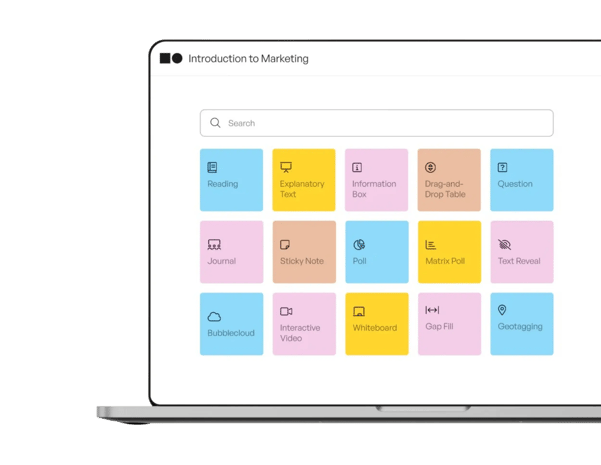
If you want to create genuinely engaging and interactive Canvas courses without any coding, insendi's integration offers the most complete solution available. Rather than bolting on external tools or wrestling with HTML, insendi brings rich pedagogical functionality directly into your existing (and familiar) Canvas environment.
What makes insendi different is its focus on educational purpose and online course engagement. Each of the 30+ activities is designed around sound pedagogical principles (such as Laurillard's Conversational Framework), and not just interactivity for the sake of it. This means you can build courses that are engaging and educationally meaningful at the same time.
Insendi also includes inbuilt learner analytics, so you can see how learners are engaging with the activities in your course and adjust your approach accordingly. It also integrates directly into Canvas, which means course builders can do so in their familiar LMS environment, and learners don't need to navigate to separate platforms or remember additional logins.
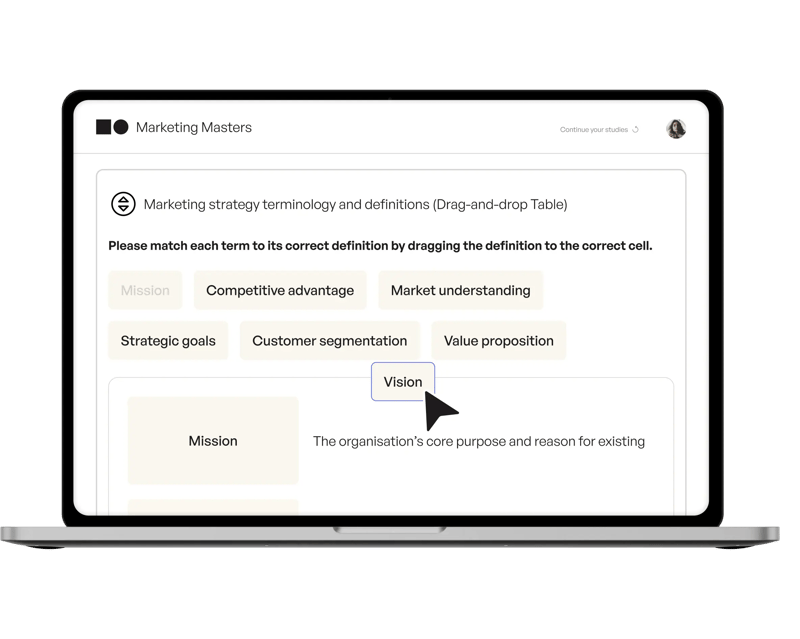
Insendi features
30+ code-free engaging activities
From collaborative whiteboards to multimedia feedback tools, you have a wide range of interactive engagement options ready to use immediately.
Native Canvas integration
Everything works directly inside your existing LMS, creating a unified experience for both you and your learners (who won't need logins for insendi in order to interact with the activities).
Inbuilt learner analytics
Track engagement patterns and identify learners who may need additional support before they fall behind.
Accessibility compliance
Activities are designed with inclusive design principles (such as being fully responsive to computer, tablet, and mobile screen sizes), helping you meet accessibility requirements.
AI-assisted development
Accelerate course creation with intelligent suggestions while maintaining pedagogical quality and complete control over published content.
Some examples of the pros of using insendi in Canvas for online course engagement are:
- A suite of no-code, pedagogically grounded, engaging activities for Canvas.
- No external accounts or platforms required for learners and course builders.
- Dedicated consultancy support to help you get the most from the tool.
How can a course builder increase learner engagement without technical skills?
The most effective approach is to start with your learning outcomes rather than the technology. Ask yourself: what do I want learners to be able to do, and what kind of interaction would help them get there? Once you have clarity on the pedagogical purpose, finding the right approach becomes much simpler.
The other key is to start small. You do not need to redesign your entire course at once. Pick one module, add one interactive element such as an activity, and see how learners respond before expanding. This is why it's important to choose a tool with built-in analytics, so that you can easily keep track of engagement and behaviour without needing multiple platforms and data sources.
Is there a difference between engagement and interactivity in online courses?
Yes, there's a difference between engagement and interactivity. Interactivity describes what learners can do, such as click, respond, collaborate, create, etc. Engagement, on the other hand, describes what learners actually experience, such as interest, attention, investment, and persistence. A course can be highly interactive but still fail to engage learners if the interactions feel pointless or disconnected from learning goals. True engagement happens when interactivity serves a clear pedagogical purpose.
Why insendi is the top choice for no-code Canvas course interactivity and engagement
Creating engaging online courses should not require coding skills, external tools, or a dedicated development team. Insendi makes rich pedagogical functionality accessible to every course builder working in Canvas, even those without advanced technical skills.
What sets insendi apart is its focus on educational outcomes rather than technical novelty. Every one of the 30+ activities is grounded in learning science, and the platform includes guided support to help you implement them effectively. Insendi gives you the tools to build courses that genuinely engage learners—not just courses with interactive elements for the sake of it.
If you want to improve online course quality without increasing workload, insendi offers a practical path forward.
FAQs about no-code online course engagement with insendi
What is a no-code approach to online course design?
A no-code approach means you can create interactive learning experiences without writing any programming code or editing HTML. For example, insendi means anyone can design and create engaging Canvas courses using ready-to-go, fully responsive activities with no coding or SCORM editing. This removes technical barriers while maintaining educational quality.
How can I make my Canvas course more interactive without external tools?
Insendi integrates directly into Canvas, giving you access to 30+ engaging activities without requiring learners to leave the LMS or create additional accounts. You can add interactive elements such as whiteboards, peer feedback, multimedia discussions, and more, all within your existing Canvas course structure.
Do no-code course activities work for large cohorts?
Yes. Insendi designs its activities with scalability in mind, including features like automatic screen responsiveness, peer feedback distribution, and built-in analytics that help you monitor engagement across large numbers of learners. The goal is to increase effective interactivity without proportionally increasing your facilitation workload.
What types of learner engagement activities work for asynchronous courses?
Asynchronous courses benefit from activities that allow flexible participation while still creating connection. Discussion boards, peer feedback exchanges, collaborative whiteboard contributions, and multimedia reflection posts all work well.
Can these no-code activities be added into my existing Canvas courses?
Yes, you can also add insendi's no-code activities into existing Canvas courses to improve interactivity and engagement.
How do I measure whether my activities are actually engaging learners?
With a tool like insendi, you can access built-in learner analytics that show how learners are interacting with course content and activities. You can see completion patterns, identify learners who may need support, and track engagement trends across your course. This data helps you refine your approach based on evidence rather than guesswork.
Can I create accessible interactive content without coding?
Accessibility is built into insendi's activity designs, following inclusive design principles that support learners using assistive technologies. You can create interactive experiences that meet accessibility requirements without needing to understand the technical implementation details.